


BenQ RD240Q 24 Inch Professional Monitor
BenQ RD240Q 24 Inch Professional Monitor
Out of stock
People are watching right now.
Couldn't load pickup availability
We don't share your information with others.
Pick up from Micro Center India
Same-day order before 1:30 PM
Courier Delivery
Delivered to your specified address


BenQ RD240Q 24 Inch Professional Monitor prioritize comforts during long-term projects with ergonomics and eye-care.
BenQ RD240Q 24 Inch is a programming monitor used for professional purpose only, especially those who want to do coding with a swift press of the >. This 24 inch monitors prioritize comforts during long-term projects with ergonomics and eye-care.
Features:
RD240Q|24.1” WQXGA BenQ Programming Monitor
- Advanced coding modes for improved code differentiations: BenQ Programming Series is crafted for crafted for programmers
- Boost productivity with a swift press of the > Coding HotKey to instantly enter the coding realm
- BenQ Programming Monitors prioritize comforts during long-term projects with ergonomics and eye-care
Scroll Less & Achieve More with a Rare 16:10 Ratio
With a unique 16:10 ratio design, RD240Q is crafted for programmers to provide them with an expansive field of view.
Ultra-sharp Coding, Glare-Free Brilliance
Crafted for Programmers: BenQ Programming Monitor offers you full immersion in your code no matter where you are.
Superior Code Differentiation
BenQ’s advanced coding modes ensure crystal-clear fonts and improved code differentiation, reducing eye strain during prolonged use.
Code with Comfort and Efficiency
Offer both dark and light themes for adaptable coding environments. Swiftly adjust brightness, sharpness, and contrast for optimal coding conditions.
Control the Display Settings with Display Pilot 2
Display Pilot 2 is designed to meet your needs. Users can arrange preferred functions with ease, including Shortcuts, Desktop Partition, Application Mode, Software Dimming, Circadian Mode, and more.
Assign Different Modes to Applications
Application Mode makes it easy to assign different color modes and remembers your frequently-used settings for upcoming applications. Binding your IDE with RD series advanced coding modes for the state of flow!
Intelligent Circadian Displays for Comfortable Eyes
BenQ Low Blue Light Plus includes Circadian Mode, which automatically adjusts your screen’s color temperature throughout the day, mirroring the natural sunrise to sunset cycle. Enjoy eye comfort worry-free.
Boost Efficiency with Display Pilot 2 Shortcuts
Exclusive Shortcuts allows you to easily bind commonly used functions to the hotkeys. With Display Pilot 2, copying and pasting shortcuts is no longer limited to one set at a time; it conveniently remembers two sets of content at once.
Coding Hotkey and Function Bar for Hands-On in a Snap
Effortlessly boost productivity with our unique Coding HotKey and Function Bar designs. With a swift press of the Coding HotKey at the heart of the function bar, immerse yourself instantly into the coding realm.
Optimization for Maximum Physical Comfort
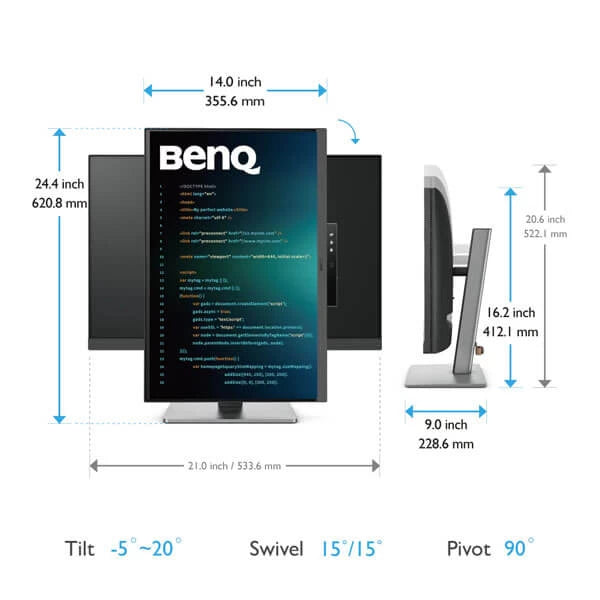
Enhance your coding workspace with adjustable height, tilt, pivot, and swivel capabilities for optimal efficiency and comfort.
Optimal Posture, Superior Output
Relieve prolonged neck and body aches. BenQ Programming Monitors prioritize your comfort for long-term projects.
Coders’ Dream Desk Setup : Comfort and Flexibility at Its Core
Create your personalized workspace and fully enjoy it.
Endless Horizons, Intuitive Workflows
Whether it’s multi-screen integration or single-screen data comparison, a BenQ Programming Monitor meets your multitasking needs.
Seamless Connectivity with Easy Plug and Play
BenQ Programming Monitor offers ample port options, including USB Type-C for all-in-one connectivity.
Night Hours Protection
Discover enhanced eye protection in dark with our Night Hours Protection. Its intelligent ambient light detection and auto-switch capabilities require minimal user intervention, ensuring effortless and consistent eye care.
Brightness Intelligence Gen2
B.I. Gen2 emphasizes automatic detection of environmental brightness for automated screen brightness adjustments. You can also customize screen brightness for your preferences while caring for your eyes.
Code with Refreshed Eyes
For over a decade, BenQ leading Eye-Care Technology has safeguarded your eye health and provided comfort during long hours of screen time. Global safety authority TÜV Rheinland certifies RD240Q’s Flicker-Free and Low Blue Light as truly friendly to the human eye. Eyesafe 2.0 certification ensures that the display reduces blue light while maintaining vivid color.
BenQ’s Green Commitment : A Vision of Sustainability
BenQ prioritizes eco-friendly practices in our product development, underlining our commitment to sustainability. BenQ Programming Monitors incorporate eco-friendly technology, recycled materials, and energy-efficient design.
Specifications:
| Model Name | RD240Q |
| Display | |
| Screen Size | 24.1 inch |
| Panel Type | IPS |
| Backlight Technology | LED backlight |
| Resolution (max.) | 2560×1600 |
| Brightness (typ.) | 300 nits |
| HDR | HDR10 |
| Viewing Angle (L/R) (CR>=10) | 178°/178° |
| Response Times (GtG) | 5 ms |
| Native Contrast | 1000:1 |
| Refresh Rate (Hz) | 60 |
| Color Gamut | 95% P3 |
| Color Mode | Cinema, Coding – Dark Theme, Coding – Light Theme, ePaper, HDR, M-Book, User |
| Aspect Ratio | 16:10 |
| Display Colors | 1.07 billion colors |
| PPI | 125 |
| Display Screen Coating | Anti-Glare |
| Color Temperature | Bluish, Normal, Reddish, User Define |
| Gamma | 1.8 – 2.6 |
| HDCP | 2.2 |
| AMA | Yes |
| Audio | |
| Built-in Speaker | 2Wx2 |
| Headphone Jack | Yes |
| Power | |
| Voltage Rating | 100 – 240V |
| Power Supply | Built-in |
| Power Consumption (normal) | 20 W |
| Power Consumption (max) | 178 W |
| Power Consumption (sleep mode) | <0.5 W |
| Power Delivery(USB C / Thunderbolt 3) | 90 W |
| Dimension And Weight | |
| Tilt (down/up) | -5˚ – 20˚ |
| Swivel (left/right) | 15˚/ 15˚ |
| Pivot | 90˚ |
| Height Adjustment Stand | 110 mm |
| Dimensions (HxWxD) (mm) | 412.1 – 522.1×533.6×228.6 |
| Dimensions (HxWxD) (inch) | 16.2 – 20.6×21.0x9.0 |
| Dimensions (HxWxD) (Landscape) (mm) | 522.1×533.6×228.6 |
| Dimensions (HxWxD) (Landscape) (inch) | 20.6×21.0x9.0 |
| Dimensions (HxWxD) (Pivot) (mm) | 620.8×355.6×228.6 |
| Dimensions (HxWxD) (Pivot) (inch) | 24.4×14.0x9.0 |
| Dimensions (HxWxD) (w/o Base) (mm) | 355.6×533.6×71.3 |
| Dimensions (HxWxD) (w/o Base) (inch) | 14.0×21.0x2.8 |
| Net Weight (kg) | 7.6 |
| Net Weight (lb) | 16.8 |
| Net Weight (w/o Base) (kg) | 5.0 |
| Net Weight (w/o Base) (lb) | 11.0 |
| VESA Wall Mount | 100×100 mm |
| Accessories | |
| Other Accessories | QSG, Safety Instruction, Warranty Card |
| Connectivity | |
| HDMI (v2.0) | 1 |
| DisplayPort (v1.4) | 1 |
| USB C(PowerDelivery 90W, DisplayPort Alt Mode, Data) | 1 |
| Daisy Chain Technology | USB C out ( MST) |
| USB Type-A downstream (USB 3.2 Gen 1, 5 Gbps, power charging 4.5W) | 3 |
| USB Type-C downstream (USB 3.2 Gen 1, 5 Gbps, power charging 7.5W) | 1 |
| Eye Care | |
| Flicker-free Technology | Yes |
| Brightness Intelligence Gen2 (B.I. Gen2) | Yes |
| Low Blue Light Plus | Yes |
| Color Weakness | Yes |
| ePaper | Yes |
| Eye Reminder | Yes |
| Night Hours Protection | Yes |
| Environmental Standards | |
| Energy Star | 8.0 |
| TCO Certified | 9.0 |
| EPEAT | Bronze |
| Certification | TUV Certificate: Eye Comfort 2.0, EyeSafe 2.0, Flicker-free, Low Blue light (Hardware Solution) , Low Blue light (Software Solution) |
| Professional | |
| Auto Pivot | Yes |
| FW update by USB | Yes |
| Software | Display Pilot 2: Yes |
| Warranty | 3 Years |
| Note | *** Features, Price, Specifications are subject to change without notice. |
Specifications will be updated soon.
FAQs will be updated soon.
- Choosing a selection results in a full page refresh.
- Opens in a new window.
