Skip to product information
1 of 6

COLORFUL BATTLE-AX B450M-T M.2 V14 MOTHERBOARD

COLORFUL BATTLE-AX B450M-T M.2 V14 MOTHERBOARD

Low stock: 7 left

Regular price Rs. 5,539.00 INR
Regular price Rs. 9,999.00 INR Sale price Rs. 5,539.00 INR
Sale Add to Cart
Shipping calculated at checkout.

People are watching right now.

Paylater is only available for transactions upto ₹ 2000.

Pick up from Micro Center India

Same-day order before 1:30 PM

FREE

Courier Delivery

Delivered to your specified address

3–5 DAYS
24/7 CUSTOMER SUPPORT
100% SECURE CHECKOUT
Payment Methods:
Visa BHIM UPI PhonePe Google Pay Mastercard
View full details

COLORFUL BATTLE-AX B450M-T M.2 V14 MOTHERBOARD

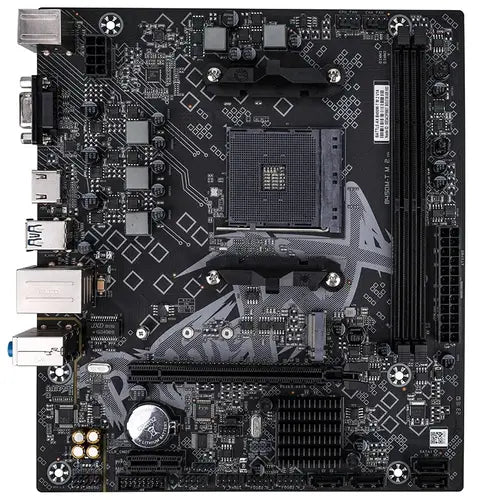
BATTLE-AX B450M-T M.2 V14 from Colorful is a reliable and compact Micro-ATX motherboard designed for AMD Ryzen desktop processors using the AM4 socket. Built on the AMD B450 chipset, it delivers solid performance for everyday computing, office systems, and entry-to-mid range gaming builds.

 Performance & Compatibility

  • Chipset: AMD B450

  • CPU Support: AMD Ryzen series processors (AM4 socket)

  • Memory Support:

    • 2× DDR4 DIMM slots (up to 64GB, 32GB per slot)

    • Supports DDR4 up to 3600MHz (OC)

    • Dual-channel memory architecture

    • XMP support for optimized memory performance

This board provides stable and efficient processing power, making it suitable for multitasking and gaming setups.

 Storage Options

  • 1× M.2 slot (PCIe 3.0 x4, 2242/2260/2280) for high-speed NVMe SSDs

  • 4× SATA 6Gb/s ports for HDDs or SATA SSDs

The PCIe Gen3 x4 M.2 slot ensures fast boot times and rapid data transfer speeds.

 Graphics & Expansion

  • 1× PCIe 3.0 x16 slot (for graphics cards)

  • 1× PCIe 3.0 x1 slot (for additional expansion cards)

  • Display Outputs:

    • HDMI 2.0 (supports up to 4K @ 60Hz)

    • VGA

Perfect for builds using Ryzen APUs with integrated graphics or dedicated GPUs.

 Connectivity & I/O

Rear I/O Ports:

  • 2× USB 3.2 Gen 1 Type-A

  • 4× USB 2.0

  • 1× Gigabit LAN (RTL8111H)

  • 3× Audio jacks (7.1 channel support via Realtek ALC897)

  • 1× PS/2

  • HDMI + VGA

Internal Headers:

  • USB 2.0 & USB 3.2 Gen 1 headers

  • Front audio & front panel headers

  • CPU & system fan headers

  • COM port header

  • Clear CMOS jumper

  • Debug light pin

 Audio & Networking

  • LAN: Realtek RTL8111H Gigabit Ethernet

  • Audio: Realtek ALC897 codec with 7.1-channel HD audio

Delivers stable wired networking and clear, high-definition sound output. Reliability & Build Quality

  • 128M UEFI BIOS with multi-language support

  • Advanced hardware monitoring (temperature, voltage, fan speed control)

  • Supports S3/S4/S5 wake-up functions

  • Six major protective technologies for system stability

  • Strict multi-process quality testing

  • Upgraded PCB atomization process

 Form Factor

  • Micro-ATX (M-ATX)

  • Dimensions: 220mm × 195mm

Compact design makes it suitable for small and mid-sized PC cases.

 Ideal For:

  • Budget gaming builds

  • Office and productivity PCs

  • Home multimedia systems

  • Entry-level workstation setups

  • Storage:

    1× M.2 PCIe 3.0 ×4 slot (2242/2260/2280)

    4× SATA 6 Gb/s ports

    Expansion Slots:

    1× PCIe 3.0 ×16

    1× PCIe 3.0 ×1

    Rear I/O:

    2× USB 3.2 Gen1

    4× USB 2.0

  • HDMI 2.0 (4K@60Hz)

    1× VGA

  • PS/2

    1× Gigabit LAN

    3× Audio jacks (7.1)

    Audio: Realtek ALC897 (7.1 channel)

LAN: Realtek RTL8111H
Gigabit Ethernet

  • BIOS:
    128M UEFI (multi-language)
  • Fan
    & Headers:
    CPU fan, system fan, USB & front panel headers

Special Features:
Fan/temperature/voltage monitoring, USB wake-up, Clear CMOS

1. How do I update the BIOS on this motherboard?

Colorful doesn’t include a built-in BIOS flash utility in
the BIOS menus for this model, and the manual doesn’t detail the exact steps.
To update the BIOS you generally need to:

  • Go
    to Colorful’s official support page and search for the BATTLE-AX
    B450M-T M.2 V14 BIOS downloads.
  • Download
    the latest BIOS file.
  • Prepare
    a USB flash drive (FAT32 format) and place the BIOS file on it.
  • Enter
    BIOS at boot (usually by pressing Del/F2).
  • Look
    for a BIOS update option (if present), or use any BIOS flash utility noted
    by Colorful’s official guide/QR code in the manual.

2. Which Ryzen processors are compatible?

This motherboard supports AMD Ryzen series CPUs that
fit the AM4 socket. For the specific list of supported Ryzen models
(e.g., Ryzen 1000/2000/3000/4000/5000 series), you should check the official
compatibility list on Colorful’s website, as this information changes with BIOS
revisions.

 In general, most B450
boards support older Ryzen chips out-of-the-box (Ryzen 1000, 2000, and often
Ryzen 3000), but newer Ryzen 5000 series CPUs may require a BIOS update.

3. Is it good for budget gaming?

Yes — this board is a decent choice for a budget gaming
build
:

  • It
    supports Ryzen CPUs with strong performance levels (e.g., Ryzen 3/5/7
    series).
  • Offers
    an M.2 NVMe slot for fast SSD storage.
  • Has
    HDMI/VGA outputs and PCIe x16 for a discrete GPU.
  • Dual-channel
    DDR4 support and Gigabit LAN are suitable for gaming setups.

However, it’s more entry-level compared to gaming-focused
boards with stronger power delivery or VRM cooling. If you plan heavy CPU
overclocking or top-tier Ryzen 5000/7000 CPUs, you might consider a higher-end
motherboard.

4. Do I need to update BIOS before installing a new Ryzen
CPU?

  • If
    your Ryzen CPU is recent (e.g., Ryzen 5000):
    A BIOS update might be
    necessary
    for proper booting, depending on the board’s pre-installed
    firmware version when you bought it.
  • If
    your CPU is older (Ryzen 1000/2000/3000):
    Most boards ship with BIOS
    versions that support them.

Check the support page for the latest BIOS release notes and
CPU support list before installing — updating BIOS improves compatibility but
carries risks if done incorrectly.

5. What should I do if my board doesn’t boot after
installing a CPU?

If the system doesn’t POST after installing a newer Ryzen
CPU, it’s often due to BIOS incompatibility with that processor. In such cases:

  • Try
    using an older Ryzen CPU that the board supports out-of-the-box to update
    BIOS.
  • Or
    use BIOS Flashback/USB methods (if the board supports them) to update
    firmware without a CPU.

6. Does this motherboard support Ryzen 5000 series?

It may support selected Ryzen 5000 series processors with
a BIOS update
. Compatibility depends on the BIOS version installed. Always
check the official CPU support list before purchasing.

7. Does it support CPU overclocking?

Yes. Since it uses the AMD B450 chipset, it supports CPU and
memory overclocking. However, due to its entry-level VRM design, it’s
recommended for light to moderate overclocking rather than extreme tuning.

8. Does it have built-in Wi-Fi or Bluetooth?

No. This motherboard does not include built-in Wi-Fi
or Bluetooth. You will need a PCIe Wi-Fi card or USB Wi-Fi adapter if wireless
connectivity is required.

9. Can I use both M.2 and SATA drives at the same time?

Yes. The board provides:


  • M.2 PCIe 3.0 x4 slot

  • SATA 6Gb/s ports

You can use them simultaneously (check manual for any SATA
lane sharing limitations).

10. Does it support high-end graphics cards?

Yes. It has:


  • PCIe 3.0 x16 slot

It can support modern GPUs, but performance may depend on
your CPU and power supply. Ideal for budget to mid-range GPUs.

11. What is the maximum RAM capacity?

  • 64GB
    total

  • DDR4 slots (32GB per slot)
  • Supports
    up to 3600MHz (OC)

12. Does it support NVMe SSD?

Yes. The M.2 slot supports PCIe 3.0 x4 NVMe SSDs
(2242/2260/2280 sizes).


COLORFUL BATTLE-AX B450M-T COLORFUL BATTLE-AX B450M-T M.2 V14 MOTHERBOARD

Rs. 5,539.00 Rs. 9,999.00