


Elgato Stream Deck Neo USB Productivity Controller
Elgato Stream Deck Neo USB Productivity Controller
Out of stock
People are watching right now.
Paylater is only available for transactions upto ₹ 2000.
Couldn't load pickup availability
We don't share your information with others.
Pick up from Micro Center India
Same-day order before 1:30 PM
Courier Delivery
Delivered to your specified address


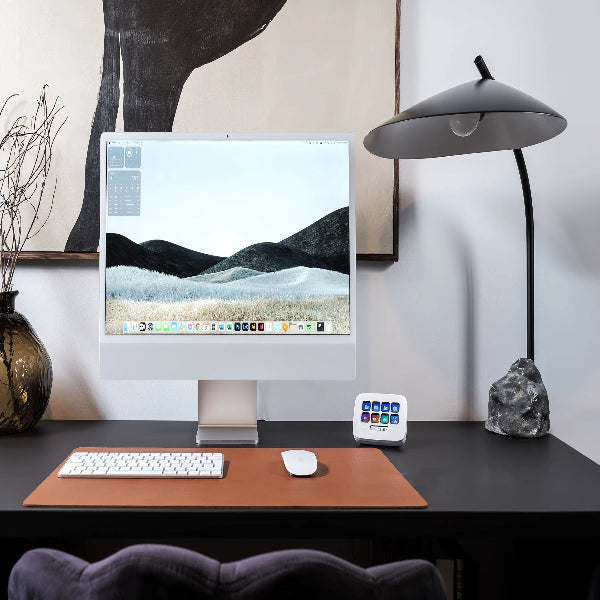
Elgato Stream Deck Neo – Powerful USB Stream Controller for Faster Productivity
The Elgato Stream Deck Neo is a compact and versatile USB Stream Controller designed to make everyday computer tasks faster, easier, and more convenient. With eight customizable keys, Stream Deck Neo allows you to create shortcuts, automate repetitive actions, and manage applications with simple one-touch controls.
Designed for productivity as well as creative workflows, this Macro Pad helps reduce the time spent navigating menus, searching for commands, and switching between applications. Whether you are working, creating content, managing applications, or organizing your daily digital tasks, the Elgato Stream Deck Neo provides quick access to the functions you use most.
A key feature of the Stream Deck Neo is its Infobar positioned between two Touch Points. These Touch Points allow you to move between different key layouts, giving you additional flexibility beyond the eight physical keys. This makes it easier to organize shortcuts for different applications, workflows, or tasks.
Why Choose the Elgato Stream Deck Neo?
The Elgato Stream Deck Neo stands out as a practical productivity device for users who want greater control over their digital workspace without adding complicated equipment. Its customizable controls let you create a personalized setup around the tasks you perform most frequently.
Eight Customizable Keys
The Stream Deck Neo features eight customizable keys that can be configured for different actions. Instead of repeatedly navigating through software menus, you can assign commonly used functions to individual keys and access them instantly.
This makes the Stream Deck Neo useful for a wide range of everyday workflows, including application management, shortcuts, repetitive tasks, and productivity routines.
Switch Between Different Key Layouts
The integrated Infobar and two Touch Points add another level of flexibility to the Stream Deck Neo. By tapping between layouts, you can access different sets of customized keys without needing additional physical controls.
This allows the device to adapt to different applications and workflows while keeping your workspace organized.
Built for Everyday Productivity
The Elgato Stream Deck Neo is not limited to a single type of user. Its customizable design makes it suitable for people who want to streamline everyday computer operations and create a more efficient workflow.
Instead of relying entirely on keyboard shortcuts or navigating through multiple menus, you can bring frequently used actions directly to your fingertips.
Performance & Usability
Fast Access to Frequently Used Actions
The main advantage of a Stream Controller is convenience. Stream Deck Neo lets you assign frequently used actions to its customizable keys, helping you perform tasks with fewer steps.
For users who regularly repeat the same computer actions, this can make everyday workflows more efficient and easier to manage.
Personalize Your Workflow
Every user works differently, which is why customization is an important part of the Stream Deck Neo experience. The eight customizable keys can be arranged around your preferred workflow, allowing you to create a control layout that matches the tasks you perform most often.
Ideal for Multiple Applications
Different applications often require different shortcuts and controls. The ability to switch between key layouts makes Stream Deck Neo adaptable to changing tasks and workflows.
You can organize your controls according to the application or activity you are working on, helping keep commonly used actions readily accessible.
Stream Controller for Creators and Power Users
For content creators, professionals, and power users, a dedicated Stream Controller can provide a more convenient way to manage frequently used actions. Stream Deck Neo combines customizable physical keys with touch-based layout switching in a compact form.
Its simple control approach makes it suitable for users who want to spend less time searching for commands and more time focusing on their work.
Design and Build
Compact and Functional Design
The Elgato Stream Deck Neo is designed around a straightforward control layout featuring eight customizable keys, an Infobar, and two Touch Points.
The arrangement keeps frequently used controls within easy reach while providing access to different key layouts through the touch points.
Clean Workspace Experience
A dedicated Macro Pad can help reduce dependence on complex keyboard shortcuts and repeated menu navigation. Stream Deck Neo brings commonly used actions into a centralized control surface, helping create a cleaner and more organized workflow.
Its practical design makes it a suitable addition to modern desktop setups where efficiency and accessibility are important.
Product Highlights
Key Features of Elgato Stream Deck Neo
-
Eight customizable keys
-
Infobar positioned between two Touch Points
-
Touch-based switching between different key layouts
-
Designed for task automation and application management
-
Suitable for everyday productivity
-
Compact Stream Controller design
-
Useful as a customizable Macro Pad
-
Helps provide quick access to frequently used actions
Who Should Buy Elgato Stream Deck Neo?
The Elgato Stream Deck Neo is a strong choice for users who frequently perform repetitive computer tasks and want a more convenient way to access shortcuts and commands.
For Content Creators
Creators can use customizable controls to organize frequently used actions and simplify application workflows.
For Professionals
Professionals who regularly work across multiple applications can benefit from quick access to commonly used tasks and different key layouts.
For Productivity-Focused Users
If you rely heavily on keyboard shortcuts, menus, and repetitive actions, Stream Deck Neo can provide a dedicated control surface that makes everyday computer interaction more convenient.
For Multitaskers
Users who regularly switch between applications can organize different actions into separate layouts, making the Elgato Stream Deck Neo a practical addition to a multitasking setup.
Consumer Value - Why Elgato Stream Deck Neo USB Productivity Controller Stands Out
The biggest advantage of the Elgato Stream Deck Neo is its combination of customization and simplicity. Instead of requiring users to memorize numerous keyboard shortcuts or repeatedly navigate through software menus, it provides dedicated customizable keys for frequently performed actions.
The addition of the Infobar and Touch Points further increases flexibility by allowing users to switch between different key layouts. This makes the device more adaptable than a basic Macro Pad with a fixed set of controls.
For users looking to improve everyday productivity, organize application controls, and create a personalized desktop workflow, the Elgato Stream Deck Neo offers a practical and user-friendly solution.
The Elgato Stream Deck Neo is a versatile Stream Controller and Macro Pad designed to simplify everyday computer interaction. Its eight customizable keys provide quick access to frequently used actions, while the Infobar and two Touch Points allow users to switch between different key layouts.
With its focus on customization, accessibility, and productivity, Stream Deck Neo is an excellent choice for users who want a dedicated control surface for managing applications and automating everyday tasks.
Note: Features, prices, and specifications are subject to change without prior notice.
