


Elgato Stream Deck USB Foot Pedal
Elgato Stream Deck USB Foot Pedal
Out of stock
People are watching right now.
Paylater is only available for transactions upto ₹ 2000.
Couldn't load pickup availability
We don't share your information with others.
Pick up from Micro Center India
Same-day order before 1:30 PM
Courier Delivery
Delivered to your specified address


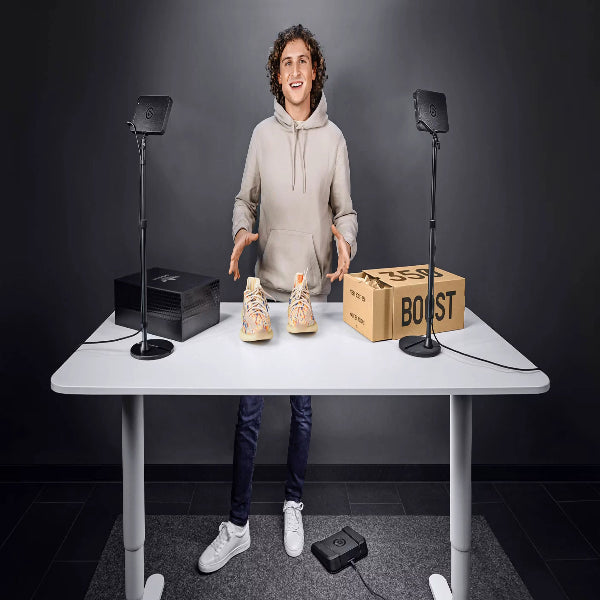
Elgato Stream Deck USB Foot Pedal – Hands-Free Control Made Simple
Introduction to Elgato Stream Deck USB Foot Pedal
The Elgato Stream Deck USB Foot Pedal is a sturdy, customizable, and discreet hands-free control device designed to give you instant access to your apps and tools without using your hands. By placing essential controls at your feet, this USB foot pedal provides a convenient way to interact with applications while keeping your hands focused on other tasks.
Designed with simplicity and flexibility in mind, the Stream Deck Pedal is ideal for users who want more convenient control over their digital workflows. Whether you are managing applications, working with creative tools, or handling tasks that require continuous hand control, the Elgato Stream Deck Pedal provides an additional method of interacting with your setup.
Why Choose the Elgato Stream Deck USB Foot Pedal?
Instant Hands-Free Control
The key advantage of the USB foot pedal is hands-free operation. Instead of reaching for your keyboard or mouse every time you need to trigger an action, you can use your foot to access assigned controls.
This makes the Stream Deck Pedal particularly useful when your hands are already occupied with another task or when maintaining a consistent workflow is important.
Customizable Controls
The Stream Deck Pedal is customizable, allowing users to configure its controls according to their preferred applications and workflow. This flexibility means the pedal can adapt to different usage scenarios rather than being restricted to a single function.
Designed Around Your Workflow
Every user has different requirements. With customizable controls, the Elgato Stream Deck USB Foot Pedal can be integrated into your preferred workflow, giving you convenient access to the functions you use most often.
Discreet Desktop Setup
The Stream Deck Pedal features a discreet design that can fit naturally into a desktop workspace. Its low-profile approach keeps the device focused on functionality without unnecessarily distracting from the rest of your setup.
Performance & Usability
Hands-Free Application Control
The USB foot pedal provides an additional control method for compatible applications and tools. By using foot-operated controls, users can perform selected actions while keeping their hands available for other work.
This can be particularly valuable in workflows where frequent keyboard or mouse interaction interrupts concentration or productivity.
Useful for Creative Workflows
Creative professionals often need to keep their hands positioned on their primary equipment while triggering additional commands. The Stream Deck Pedal provides a convenient hands-free control option that can complement an existing keyboard, mouse, or other input device.
Suitable for Multitasking
The Elgato Stream Deck Pedal can also be useful for multitasking. Instead of switching between different input devices for every action, users can incorporate foot controls into their workflow for greater convenience.
Design & Build
Sturdy Construction
The Stream Deck Pedal is designed to be sturdy, making durability an important part of its overall design. As a foot-operated device, it is built for a different type of interaction than conventional desktop controllers.
Discreet Form Factor
Its discreet design allows the pedal to remain unobtrusive within a workspace. It can be positioned under or near a desk while providing convenient access whenever hands-free control is required.
Practical Foot Control
Unlike a conventional desktop controller, the Elgato Stream Deck USB Foot Pedal allows users to interact with applications using their feet. This creates an additional layer of control without taking valuable space away from the main keyboard and mouse area.
Product Highlights
Key Features of Elgato Stream Deck Pedal
-
USB foot pedal design
-
Hands-free control for apps and tools
-
Customizable controls
-
Sturdy construction
-
Discreet design
-
Designed for convenient desktop workflows
-
Useful for creative and productivity applications
-
Provides an additional hands-free input method
Consumer Value
The main advantage of the Elgato Stream Deck USB Foot Pedal is the additional flexibility it brings to a desktop workflow. Instead of relying entirely on hand-operated controls, users can introduce foot-operated commands for selected applications and tasks.
Its combination of customization, hands-free control, sturdy construction, and discreet design makes it a practical solution for users who want to make their workflows more convenient and efficient.
Whether you are a content creator, professional user, multitasker, or anyone looking for an alternative way to control applications, the Stream Deck Pedal provides a dedicated USB foot control solution.
Who Should Use the Elgato Stream Deck Pedal?
Content Creators
Creators can benefit from hands-free controls while keeping their hands focused on their primary creative equipment.
Professionals
Professionals working with applications and tools can integrate customized foot controls into their daily workflows.
Multitaskers
Users who frequently switch between tasks can use foot-operated controls as an additional input method.
Productivity-Focused Users
Anyone looking to reduce repetitive hand movements and introduce more flexibility into their workspace can benefit from a customizable USB foot pedal.
Note: Features, prices, and specifications are subject to change without prior notice.
