


Logitech MK220 Compact Wireless Keyboard and Mouse Combo for Windows
Logitech MK220 Compact Wireless Keyboard and Mouse Combo for Windows
Low stock: 7 left
People are watching right now.
Paylater is only available for transactions upto ₹ 2000.
Couldn't load pickup availability
Pick up from Micro Center India
Same-day order before 1:30 PM
Courier Delivery
Delivered to your specified address


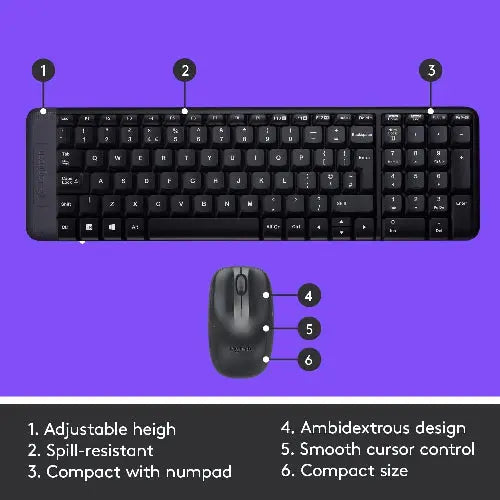
Logitech MK220 Wireless Keyboard and Mouse Combo – Compact Wireless Freedom for Modern Workspaces
Introduction
The Logitech MK220 Wireless Keyboard and Mouse Combo is a compact, efficient, and space-saving solution designed for users who want reliable wireless performance without compromising desk space. Perfect for home, office, and everyday computing, this combo combines a streamlined keyboard with a responsive mouse to deliver a clutter-free and productive experience.
Engineered with Logitech’s trusted quality, the MK220 wireless keyboard and mouse combo offers a smart balance of performance, comfort, and convenience. Its compact design makes it ideal for smaller workstations, while its wireless connectivity ensures flexibility and ease of use.
Why Choose the Logitech MK220 Wireless Keyboard and Mouse Combo
Space-Saving Compact Design
The Logitech MK220 keyboard features a compact layout that is significantly smaller than standard keyboards, helping you save valuable desk space while still maintaining essential functionality.
Reliable Wireless Connectivity
Powered by advanced 2.4 GHz wireless technology, the MK220 ensures a stable and strong connection with a range of up to 10 meters. This allows you to work comfortably without interruptions or cable clutter.
Easy Plug-and-Play Setup
The MK220 wireless keyboard and mouse combo is designed for convenience. Simply plug in the USB receiver and start using the devices instantly—no drivers or software installation required.
Long-Lasting Battery Efficiency
Built with energy efficiency in mind, both the keyboard and mouse offer long battery life. The integrated on/off switches help conserve power, making this combo a cost-effective and low-maintenance choice.
Performance & Usability
Smooth Everyday Performance
The Logitech MK220 wireless combo delivers consistent and responsive performance for daily computing tasks, including:
-
Office productivity and document work
-
Web browsing and online meetings
-
Light multitasking and home usage
-
Educational and remote work setups
Quiet and Comfortable Typing
The low-profile keys provide a quiet and comfortable typing experience, making it suitable for shared workspaces or late-night usage without disturbing others.
Precise Mouse Control
The compact wireless mouse offers smooth tracking and responsive cursor movement, ensuring accurate navigation across various applications.
Freedom of Movement
With a wireless range of up to 10 meters, you can work from a distance, present with ease, or maintain a clean and organized desk setup.
Design & Build Quality
Minimalist and Modern Aesthetics
The Logitech MK220 features a sleek and minimal design that blends effortlessly into any workspace. Its compact structure enhances desk organization while maintaining a professional appearance.
Ergonomic and Lightweight Build
The keyboard and mouse are designed for comfort and ease of use. The lightweight construction makes them easy to handle, while the mouse fits naturally in the hand for extended usage.
Durable Construction
Built with Logitech’s renowned durability standards, the MK220 combo is designed to withstand everyday wear and tear, ensuring long-term reliability.
Consumer Value – Why It Stands Out
The Logitech MK220 Wireless Keyboard and Mouse Combo stands out in its category due to its compact form factor, reliable wireless performance, and affordability. Compared to traditional full-size combos, it offers:
-
Space-saving design ideal for smaller desks
-
Strong wireless connectivity without lag
-
Hassle-free setup with plug-and-play functionality
-
Energy-efficient operation for extended battery life
-
Trusted Logitech quality at a competitive price
For users seeking a compact wireless keyboard and mouse combo that delivers both performance and convenience, the MK220 is an excellent choice.
Key Features
-
Compact keyboard design for space-saving efficiency
-
2.4 GHz wireless connectivity with up to 10-meter range
-
Quiet, low-profile keys for comfortable typing
-
Plug-and-play USB receiver for easy setup
-
Energy-efficient design with long battery life
-
On/off switches to extend battery usage
-
Lightweight and ergonomic mouse for precise control
-
Sleek and modern design for any workspace
Note: Features, prices, and specifications are subject to change without prior notice.
