

SAPPHIRE NITRO Plus AMD Radeon RX 9060 XT GAMING OC 16GB GDDR6 Graphics Card
SAPPHIRE NITRO Plus AMD Radeon RX 9060 XT GAMING OC 16GB GDDR6 Graphics Card
Out of stock
People are watching right now.
Paylater is only available for transactions upto ₹ 2000.
Couldn't load pickup availability
We don't share your information with others.
Pick up from Micro Center India
Same-day order before 1:30 PM
Courier Delivery
Delivered to your specified address


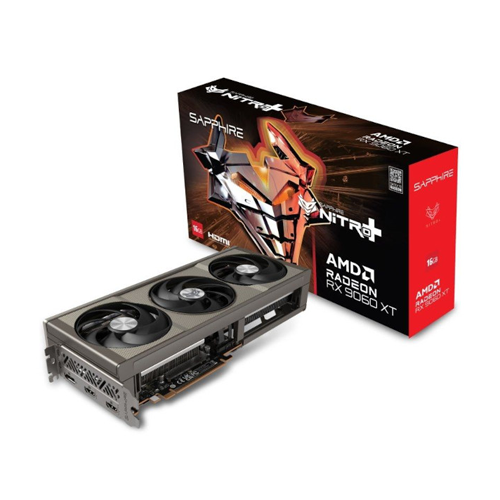
The SAPPHIRE NITRO+ RX 9060 XT GAMING OC pairs AMD's RDNA 4 architecture and 16GB of GDDR6 memory with a triple fan cooler, a full metal backplate and ARGB lighting. It is Sapphire's top RX 9060 XT, aimed at 1440p gaming where the extra 16GB of memory gives real headroom.
Cooling that stays in control
The NITRO+ uses a triple fan cooler built around an Integrated Cooling Module, which contacts the GPU, memory modules and VRMs to remove heat evenly.
- Two-ball bearing fans with AeroCurve blades
- Honeywell PTM7950 thermal interface material
- Composite heatpipes that spread heat across the cooling module
- Fan Quick Connect, where a single screw holds each fan for easy cleaning or replacement
Build and looks
A box-like frame and a metal backplate keep the card rigid, and the ARGB light bar lets you match the look of your build.
- FrameDefense box-like frame for added stability
- All-aluminium backplate that adds rigidity and helps cooling
- ARGB light bar controlled with TriXX software, plus a 3-pin ARGB header for motherboard sync
- High TG copper PCB built for the power demands of the GPU and memory
Gaming and display setups
The card pairs 2048 stream processors and 32 ray accelerators with 16GB of GDDR6 on a 128-bit memory bus.
- Boost clock up to 3320 MHz and game clock up to 2780 MHz
- HDMI and DisplayPort 2.1a outputs for up to three displays
- DirectX 12 Ultimate and OpenGL 4.6 support
- One 8-pin PCIe power connector and a 450W recommended power supply
Before you buy
- The memory bus is 128-bit. The 16GB capacity gives headroom for textures, but bandwidth is narrower than a 192-bit or 256-bit card, which shows up most at 4K.
- This is a triple fan card. Measure your case clearance and check for slot sag before you order, since it is heavier than a dual fan model.
- Plan for a 450W power supply with one spare 8-pin PCIe cable.
- It drives up to three displays. If you run four screens you will need a second card or a different model.
- ARGB lighting needs TriXX software or a motherboard 3-pin ARGB header to control, so check your board has one.
In the box: Graphics card, Documentation
